Book A Demo

See A Full Care DayRun In 20 Minutes.

Not slides. Not a brochure. We open the real software and walk one care day end to end — the rota built in front of you, a carer checking in at the door, medication recorded, the family reading the note, the compliance matrix filling in, a branded export downloaded, and Carelo AI answering a question about that company's own data.

  • Your Questions First. Bring your hardest scenario — a double-up call, a last-minute sickness, a medication refusal, a CQC evidence request.
  • Straight Answers On Price. Every band is published on the pricing page, so nothing is held back for a phone call.
  • No Obligation, No Chasing. If Carelo is not right for you, we will say so and leave you alone.
20Minutes On Screen — Longer Only If You Want It
Same DayReply To Every Request, Usually Within The Hour
£0To Migrate Your Data From Your Current System
The Twenty Minutes Covers
Rota Built Live GPS Check-In Medication The Family App Matrix & Exports Carelo AI

Book My Demo

Twenty minutes, at a time that suits your office
No Obligation 20 Minutes Your Questions First
The Walkthrough

What You Will Actually See On The Screen

One care day, followed from the moment it is planned to the moment it becomes evidence. Every screen below is the live product — the same views your office would use on day one.

01
Minutes 1 – 4

A Week's Rota, Built And Changed In Front Of You

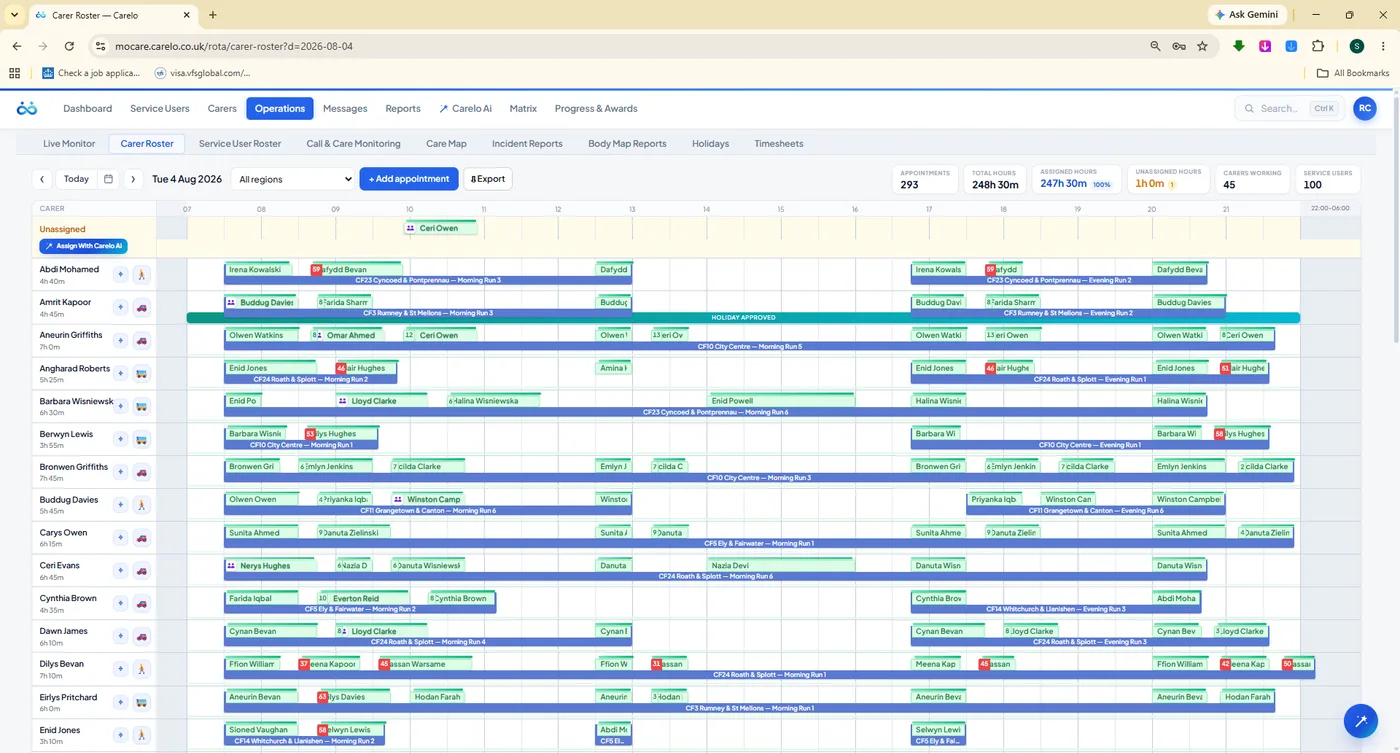
We start where your day starts. Watch a full week appear, then break it on purpose: move a call, shift a run an hour later, reassign thirty-five calls in one action, replace a carer who has gone off sick. The newest decision always wins — anything displaced turns clearly unassigned for cover, never silently double-booked.

Bulk Move & Reassign Double-Handed Calls Assign With Carelo AI
carelo.co.uk / rota / carer-roster
The Carelo carer roster — a delivered day with green delivered chips over blue planned runs
Carer Roster — Delivered Calls In Green Over The Planned Day
02
Minutes 4 – 8

A Carer Checks In At The Door — And The Office Sees It

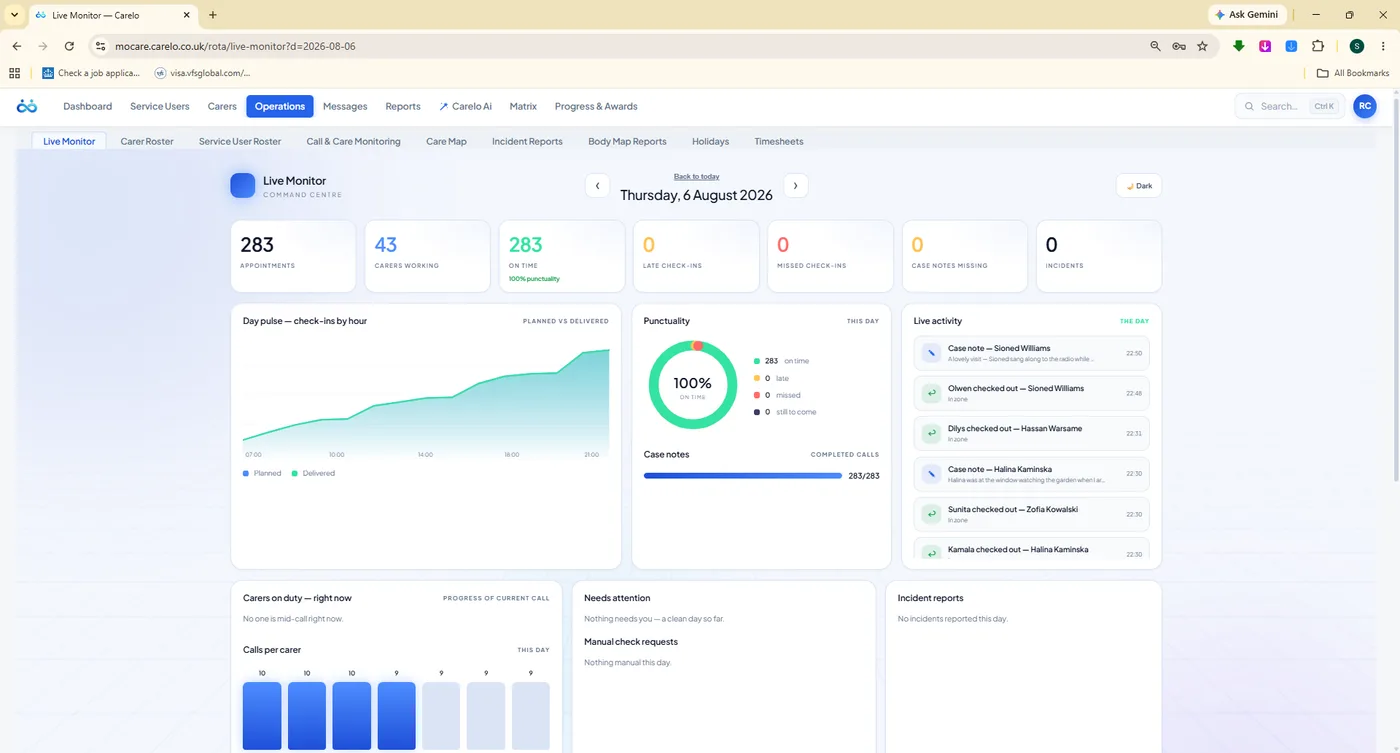
We check in from the carer app inside a geofence and switch to Live Monitor. The arrival lands with the real wall-clock time, punctuality updates, and the day's feed moves. Late and missed calls raise themselves instead of waiting for a phone call at five o'clock.

GPS Geofence Late & Missed Alerts The Day On A Map
carelo.co.uk / rota / live-monitor
Carelo Live Monitor — day stats, check-ins by hour, punctuality dial and a live activity feed
Live Monitor — The Command Centre For Today
03
Minutes 8 – 11

Medication And The Care Note Land On One Record

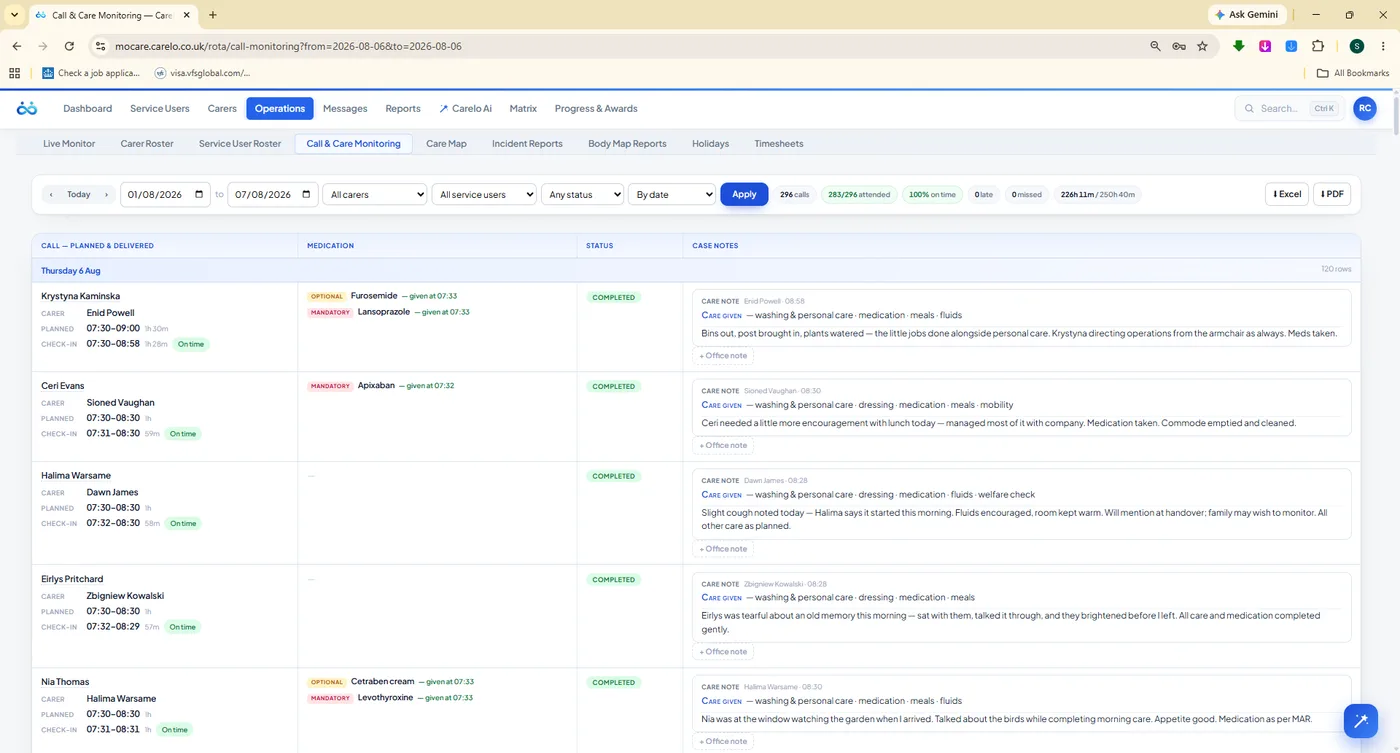
Only the medication due at that call sits at the top of the carer's screen — given, refused or missed, with the amount and the time. The office sees it seconds later beside the planned and actual times, with the care note the carer wrote at the door. One entry, one record, one version of the truth.

eMAR Due-This-Call Notes Written At The Door Compliance Audit
carelo.co.uk / rota / call-monitoring
Call and care monitoring in Carelo — planned versus check-in times, medication given and the carer's case notes
Call & Care Monitoring — Times, Medication And Notes Together
04
Minutes 11 – 14

The Family Reads That Note Minutes Later

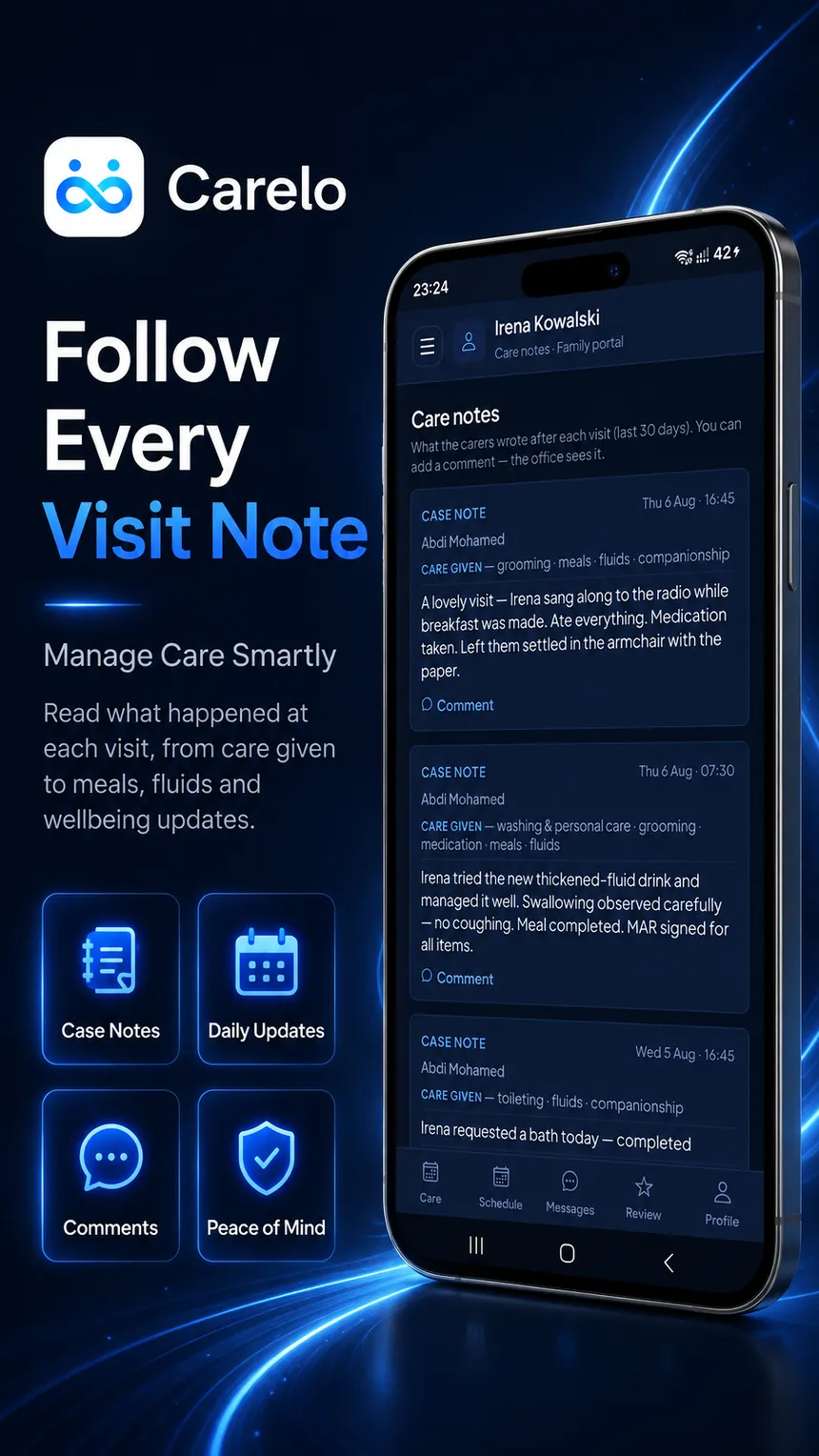
We open the family app on a phone and there it is — the visit, the carer's name, the care given and the note, with a reply box underneath. Each family sees one person and nobody else's. Messages run family-to-office only, so every conversation stays somewhere your team can stand behind. It is included in every plan, and it is the fastest way to stop five o'clock phone calls.

One Person Per Family Comments On A Note Safeguarding-Clean
The Carelo family app showing care notes from each visit with a comment option
The Family App — Free On iPhone And Android
05
Minutes 14 – 17

The Matrix Fills In — Then Exports Like A Professional Document

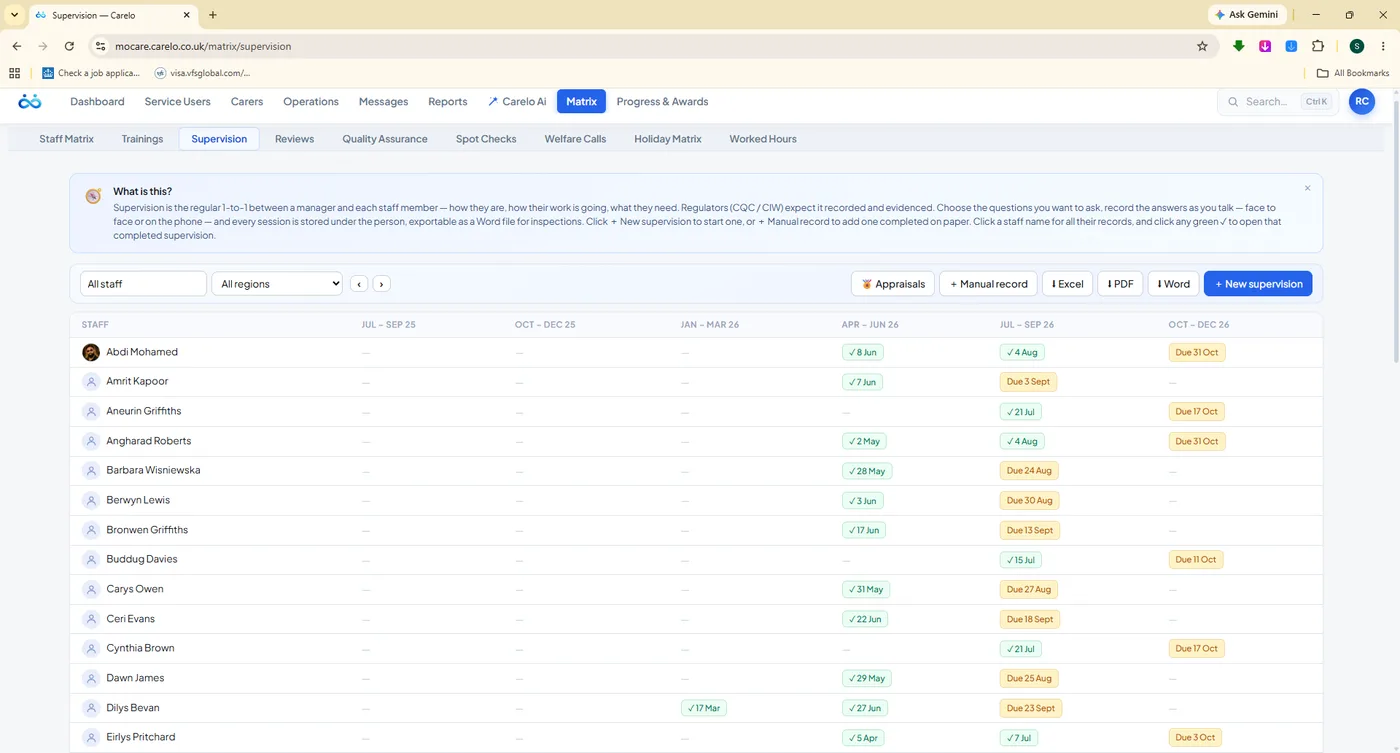
Supervisions, appraisals, reviews, quality assurance and spot checks sit in quarterly grids where due and overdue are impossible to miss. We complete one from the question bank live, then download it — and every export, Word, Excel or PDF, arrives branded with your company and Carelo: title bands, logos, zebra tables and page footers. Files a commissioner or an inspector can be handed without apology.

Quarterly Due Tracking Question Banks Word · Excel · PDF
carelo.co.uk / matrix / supervision
The Carelo supervision matrix — a quarterly grid of completed and due one-to-ones per staff member
export — every call
A branded Carelo export ready to print — the every-call report across seventeen sheets
Matrix Compliance Desks — And The Branded Export Behind Them
06
Minutes 17 – 20

Carelo AI Answers About That Company's Own Care

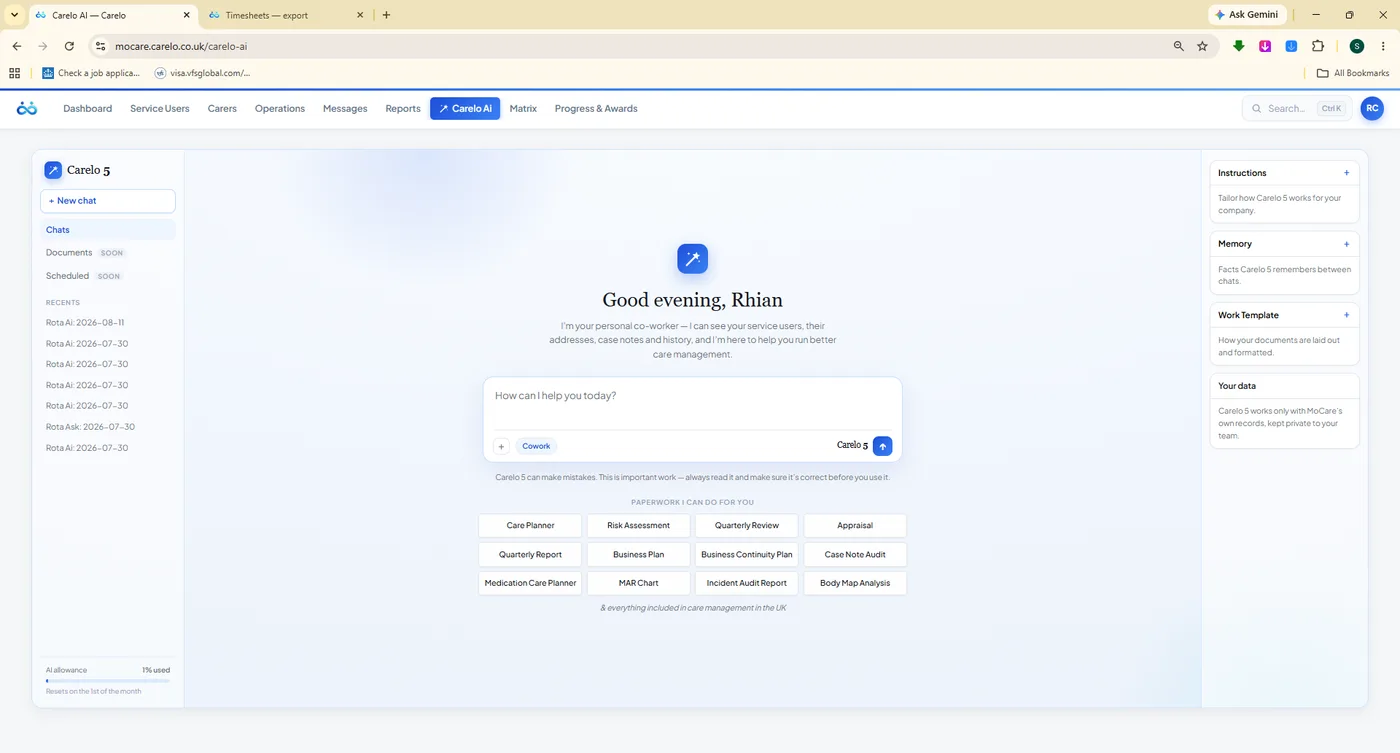
We finish by asking Carelo AI a real question — who is under-covered next week, which medication records need chasing, draft this care plan. It only ever works with that company's own visits, carers, clients and compliance, inside a token budget you set, with ChatGPT-style spending limits. A co-worker who has read the whole record, not a chatbot repeating the internet.

Scoped To Your Data Drafts Paperwork Spending Limits
carelo.co.uk / carelo-ai
Carelo AI — the assistant home with paperwork shortcuts such as care planner, risk assessment and MAR chart
Carelo AI — Per Company, Never General
Who It Is For

Tell Us Your Job Title — We Will Aim The Twenty Minutes At It

The demo is not a fixed script. Say what you are responsible for and we lead with the part of Carelo that answers to it.

Registered Managers

You carry the inspection. You want evidence that assembles itself and gaps that surface before someone else finds them.

We Lead With Matrix, Call Monitoring And Branded Exports

Care Coordinators

Your morning is sickness, cover and a rota that changed twice before nine. You want changes that take seconds and never double-book.

We Lead With Bulk Rota Edits, Cover And Live Monitor

Owners & Directors

You want delivered hours, punctuality, payroll-grade timesheets and a price you can plan around without a negotiation.

We Lead With Timesheets, Reports And Published Pricing

Franchises & Multi-Branch

You need every branch working the same way, with regions, unlimited office logins and one standard of record across the group.

We Lead With Regions, Office Logins And Group Reporting

Nothing To Install

A screen share in your browser — Teams, Google Meet or Zoom, whichever your office already uses.

Bring Whoever You Like

Manager, coordinator, a carer, the person who does payroll. Questions from all sides make it a better demo.

Your Data Stays Yours

We demonstrate on our own MoCare demo company. Nothing of yours is uploaded to see the software work.

Built In The UK, For The UK

CQC and CIW language, wall-clock times, statutory sick pay guidance and per-carer pricing in pounds.

After You Book

Three Steps, And None Of Them Are A Sales Process

No discovery call before the demo, no qualification questions, no waiting a week for a slot.

Step One

We Reply The Same Day

Usually within the hour, in working hours. You get a time that fits around calls and a link — no account, no download, no card details.

Step Two

Twenty Minutes On Screen

The care day above, led by whatever you told us matters. Stop us whenever you like; if you want an hour on the rota alone, we will do that instead.

Step Three

A Free Migration If You Join

Clients, carers, schedules and history come across from your current system at no charge, and we stay with you until the first week runs clean.

Questions Welcome

Especially The Awkward Ones

These are the questions care offices actually ask us. Ask them all in your twenty minutes — we would far rather answer them now than have you find out later.

Can I move thirty-five calls at once? What happens to a call when I reassign the carer? Can a carer edit a visit after they have checked in? How does a double-handed call work? Do families see other clients? Is the family app really included? What does an inspector actually get handed? Can I move thirty-five calls at once? What happens to a call when I reassign the carer? Can a carer edit a visit after they have checked in? How does a double-handed call work? Do families see other clients? Is the family app really included? What does an inspector actually get handed?
Does the AI see other companies' data? What stops the AI bill running away? Are timesheets good enough for payroll? How long does migration really take? Do you charge per client or per office login? What if a carer's phone has no signal? Can carers message families directly? Does the AI see other companies' data? What stops the AI bill running away? Are timesheets good enough for payroll? How long does migration really take? Do you charge per client or per office login? What if a carer's phone has no signal? Can carers message families directly?
Already using Nourish, Birdie, CarePlanner or a spreadsheet? Bring it to the demo — moving across costs nothing.