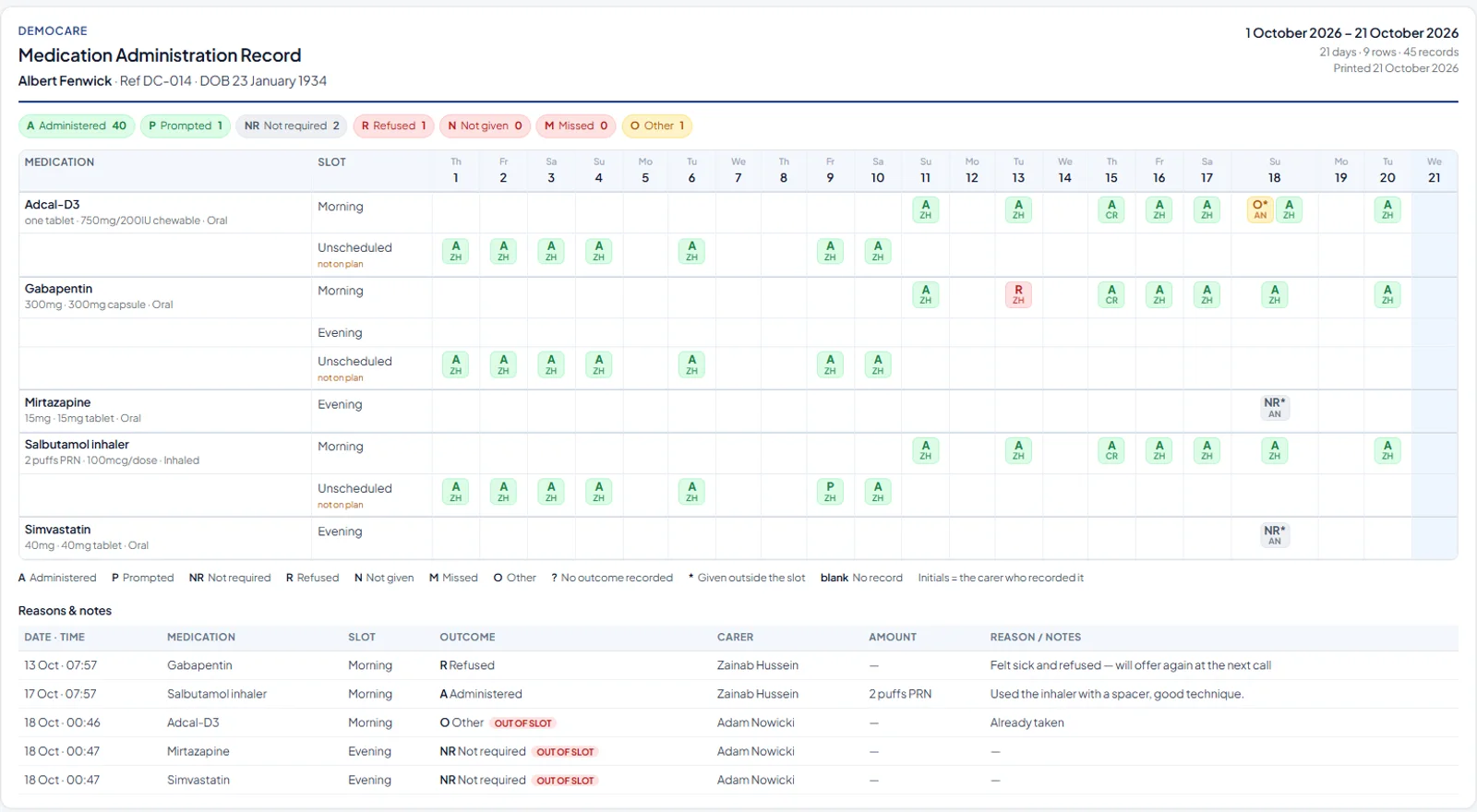
Medication is the thing care companies worry about most, and the medication administration record is the document that proves it was done right. Most electronic systems bury it in screens. Carelo's MAR chart is laid out the way pharmacists, nurses and inspectors already read it: one line per medicine and slot, one box per day, a letter and the carer's initials in each box, and a table underneath of every dose that needs a reason. This is what it looks like.
Ask a registered manager what keeps them awake and medication is the usual answer. A missed dose, a doubled dose, a refused dose nobody told the GP about, a paper chart with a gap that could mean anything. When something goes wrong, the question is always the same: show me the record. If the record is a folder in the kitchen filled in from memory, there is nothing to show. The MAR chart has to be made at the dose, by the carer who gave it, and it has to be readable by someone who was not there.
Each medicine has a line for every slot it is due in: morning, lunch, tea, evening, night. Doses recorded outside any planned slot sit on their own "unscheduled, not on plan" line so they are never mistaken for a planned dose and never hidden. Each day is a column. Each box holds a letter for the outcome and the initials of the carer who recorded it, so you can see who gave what on which day without opening anything. A blank box means no record, which is itself information. The totals across the top give the month's picture in a second: here 40 administered, 1 prompted, 2 not required, 1 refused, none missed.
A question mark marks a dose with no outcome recorded, and an asterisk marks a dose given outside its slot. Both are flags for the office, not for the carer to hide.
Every dose that is anything other than administered carries a reason, and the reasons are gathered into one table under the chart: date and time, medicine, slot, outcome, carer, amount, reason. An inspector reading "Gabapentin, morning, refused, felt sick and refused, will offer again at the next call" sees a carer doing the right thing. An as-needed inhaler recorded as "2 puffs PRN, used with a spacer, good technique" is the kind of evidence that takes a provider from Requires Improvement to Good. A dose recorded at 00:46 against a morning slot is flagged out of slot automatically, so the office can ask why rather than find it at the audit.
Inside the visit on the carer app, the medicines due in that slot are listed. The carer taps the outcome for each and adds a reason where one is required; a dose left without an outcome shows on the chart as a question mark the office sees that day. The record is stamped with the time and the carer's name and sent when there is signal. The office's chart fills in as the day goes on, and a missed or refused dose shows the same day, not at month end. The full carer-side detail is on the eMAR software page.
Pick a person and a date range and print. The header carries the company, the person's name, reference and date of birth, the range, the number of records and the date printed, so a chart handed to an inspector or a pharmacist stands on its own. The same chart exports as a branded PDF. Every plan includes it, from £59 a month, and the family app shows the family the medication log the same day, which is often the first thing a worried daughter asks for.
Yes. PRN medicines carry their maximum in 24 hours and minimum gap, each dose needs a reason, and doses given outside a planned slot appear on the unscheduled line so they are never mistaken for a planned one.
Medicines are entered from the pharmacy label or the repeat slip during setup; migration from your current system is free and we bring medication lists across and verify them with you.
Each carer records what they did under their own initials, so a double-handed call shows exactly who gave the dose.
No. The office enters and changes medicines and their rules; carers record outcomes only. Each outcome carries the time it was recorded and the carer's name.
Included on every plan, with the carer app and the family app. See pricing.
From £59 a month. Free verified migration, medication lists included. Fourteen days free.
Book a demo