1. The fourteen charts
Continence
Catheter: ml, colour, bag changes, site care, problems. Stoma: output, bag, skin around the stoma, how it looks. Bowel: Bristol stool type 1 to 7, amount, where. Continence and pads: toilet, pad change, wet or soiled, skin.
Food and drink
Fluid intake: each drink in ml against a daily target and running total. Food intake: meal, portion eaten from none to all, what was offered. Tube feeding (PEG): feed ml, water flushes, site check.
Skin
Repositioning: position, time turned, pressure areas checked.
Health checks
Observations: temperature, blood pressure, pulse, oxygen, breathing. Blood sugar: mmol/L, before or after food, insulin noted. Weight: kg, how weighed, change since last.
Wellbeing
Pain: score 0 to 10, where, what helped. Behaviour (ABC): what happened before, the behaviour, after. Seizure: time, how long, type, recovery, rescue medicine.
A person has only the charts that apply to them. A carer opening the visit sees those and nothing else.
2. Set up once, per person
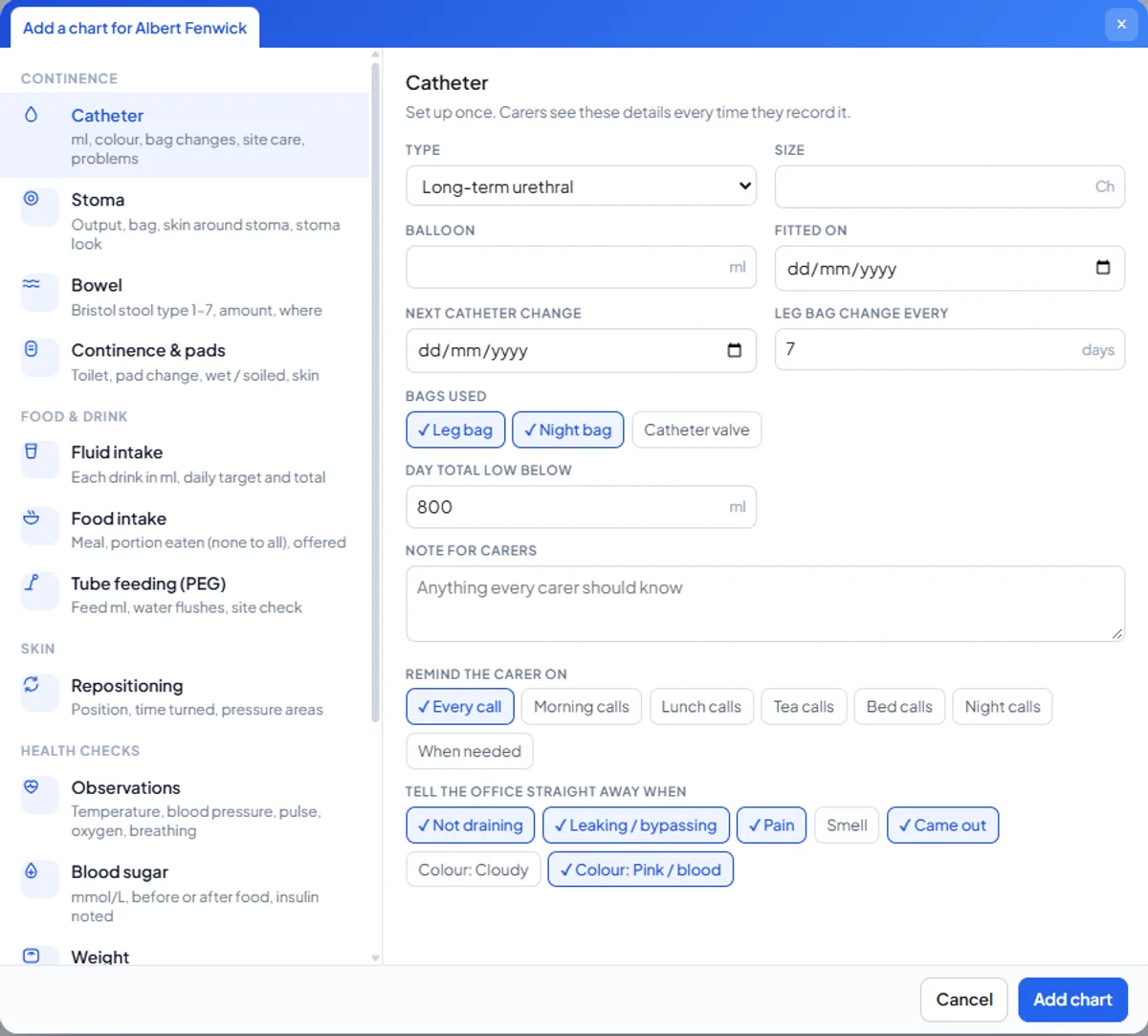
The office adds a chart from the person's record and fills in what every carer should know. For a catheter: the type and size, the balloon volume, when it was fitted and when it is next due to be changed, how often the leg bag is changed, which bags are used, and the day total below which the office wants to know. A free-text note carries anything else: "prefers the night bag attached before 9pm". The chart then appears inside the right calls, and the details travel with it so a new carer is never guessing.
3. What the carer records
Inside the visit, under the care chart, the carer records what the chart asks for: the volume and colour for a catheter, the type and amount for a bowel chart, each drink for fluids, the position and time for repositioning. The chart can remind the carer on every call, or only on morning, lunch, tea, bed or night calls, or when needed. Every entry is stamped with the time and the carer's name, and entries made without signal are kept with their original time and sent later.
4. When something is wrong
Each chart has its own list of problems that must reach the office straight away. For a catheter: not draining, leaking or bypassing, pain, smell, came out, cloudy urine, pink or bloody urine. The office ticks which of these count for this person. When a carer records one of them, a note is required and the office is alerted at that moment, not when someone reads the folder. The same applies to a stoma that looks wrong, a fluid total below target, a pressure area that has changed, a blood sugar outside range.
5. How the office responds
Operations, Care Charts lists every entry across the company. A problem is opened, moved to monitoring while the GP or district nurse is involved, and resolved with the outcome, the actions taken and the plan going forward. The office can also record an entry itself, for example after a nurse visit. The carer sees the office's response in the app, so the person who raised it knows what happened next. That chain, raised, responded, resolved, is the evidence an inspector asks for when they ask how you know your people are safe.
6. What the family sees
Families see the charts in the family app, the same day. For a daughter whose father has a catheter, knowing that today's bag changes and volumes were recorded, and that a problem was raised and answered, is worth more than any reassurance on the phone. Care charts are included on every plan with the carer app and the family app, from £59 a month.
7. Questions we are asked
Can we add a chart that is not on the list?
The fourteen cover almost everything a domiciliary provider records. Tell us what is missing; charts are added to the product for everyone, not built as custom forms per company.
Do charts print for an inspection or a hospital?
Yes. Charts export as branded documents for a person and a date range, like the MAR chart.
Can a chart be switched off when it no longer applies?
Yes. The office ends the chart and its entries stay in the record.
Does the carer have to fill every chart on every call?
No. Each chart is set to remind on the calls where it applies, or only when needed. A tea call does not ask for the morning's observations.
Is this the same for the Personal plan?
Families on the Personal plan get the same charts for their loved one, recorded by the carers they employ.
The charts that keep people safe, recorded at the call
From £59 a month, every chart included. Fourteen days free. Free verified migration.
Book a demo